
I once heard someone in the office pushing the same button over and over only to find out they were manually aligning all the objects on their poster using the arrow keys. I was hesitant to point out that the align tool in PowerPoint exists to a master’s student, because surely, they knew and had a reason to manually do it. In the end though, they genuinely didn’t know and were deeply grateful to never endlessly mash an arrow key to align objects.
If I am working on something and the task seems highly tedious and repetitive, I do my best to find a way to make it less so. This isn’t something like creating scripts to automate tasks, or offloading work onto something like ChatGPT, it’s about finding quicker more efficient ways to use basic productivity tools like Word, Excel, and PowerPoint. Over time this has developed into a sort of work philosophy; more time spent creating content, less time spent fiddling around with formatting or tedious tasks. I’ll likely make more similar posts over time since two barely scratches the surface, but I wanted to detail how to introduce using autocorrect purposefully and take the time to make sure everyone knows reference managers exist.
Tip 1: Writing your own autocorrect entries
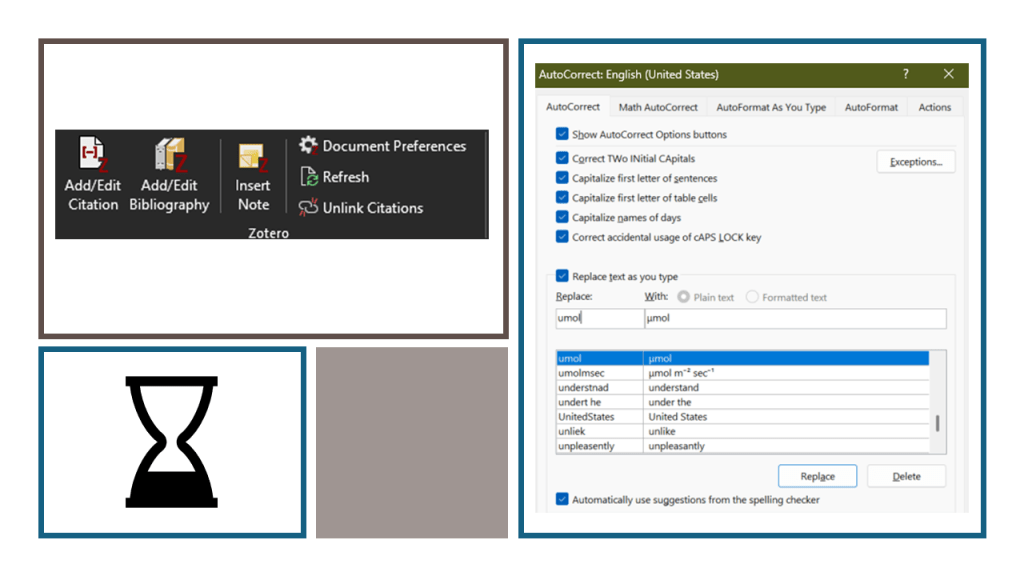
Your word processor of choice has a large dictionary of common typos that does a lot of heavy lifting while we type. Rearranging swapped letters (like my nemesis yeild and yield) is the most common application, but this dictionary can be expanded by you adding to it! I won’t get into the exact details on how to do this for each type of word processing program but essentially find the dictionary and start thinking of annoying things you don’t want to waste time typing any longer. For me, writing a lot of scientific text, I come across a mixture of symbols and Greek letters. At first, I thought searching for the symbol and pasting it into the document then copying and pasting them throughout was fine. But then I got real annoyed one day realizing how many times I accidentally left an “μmol” as a placeholder for “μmol”. So, I added the rule of umol -> μmol and never had to worry about that again. From there I have added a lot including degrees C -> °C, phipsii -> ΦPSII, and alpha -> α. It doesn’t stop there you can also add anything with a Unicode symbol so if you are annoyed using the shortcut for sub- and super-script you can reduce that a lot, for me I type ^-1, and ^-2 to get ⁻¹ and ⁻² making typing out units much smoother. Get creative and spend less time dealing with them in your text, more time typing without disruptions.
Tip 2: Reference Managers
I was taught to originally cite references by painstakingly writing every element by hand or using Microsoft Words built in reference manager (which also requires hand typing everything). I made it through high school and bachelor’s before I got to the introduction of my thesis and thought there must be a better way. Turns out there are and they are called reference managers, these are tools like Zotero and Mendeley which act as repositories to track, store and organize all your references. Added bonus, they usually can pull metadata from the file itself, so you don’t have to. From there they can be integrated with your word processor to become powerful tools. You select the citation format such as MLA, APA, or IEEE, click add citation and the manager plops it in with the proper format, then adds it to a bibliography. Best part? It all gets updated automatically. Rearrange some paragraphs or delete a citation, everything is rearranged or renumbered according to the format. Unfortunately, I am not the only person who made it to graduate school before learning this, which is why it is consistently something I bring up to new graduates and even undergraduates that I encounter. You should too, you could save someone hours or days of unnecessary work.
Conclusions
Sometimes in the thick of a project it’s hard to stop yourself to find a better way to do something. Thoughts like “This is the way I was taught”, “I don’t have time to learn how to do this better”, and “I only have to do it a couple times”, create a sunk cost fallacy that is hard to overcome. Just remember that the costs of may be small for any given task, like writing μmol m⁻² sec⁻¹ that would take about 20-30 seconds normally (if there is a μ nearby to copy and using superscript shortcut to write the numbers directly), can be reduced to less than 10 using a preplanned autocorrect option. The benefits are cumulative, so even small gains outweigh the 10 minutes needed to find out how to do something more efficiently. It could even be less than that if I wanted a more direct approach like umolmsec -> μmol m⁻² sec⁻¹. Hold up, I’m going to go add that now.
On a final note, make sure you and the people around you are using a reference manager. Seriously, the time savings from the addition of a single citation requiring updating the rest of them are huge and nothing compared to that of needing to redo them entirely because the journal or whoever is accepting the work wants a different format. We all have better things to do than spending hours than manually changing all the authors names from “last name, first initial” to “first initial, last name” in that situation.
©Donald Coon 2025 available at https://doi.org/10.5281/zenodo.17025610
This work is licensed under CC BY 4.0

 Donald S. Coon